A good way to make YT bearable again (besides the obvious), is to use the Firefox add-on BlockTube and set a filter.

A good way to make YT bearable again (besides the obvious), is to use the Firefox add-on BlockTube and set a filter.
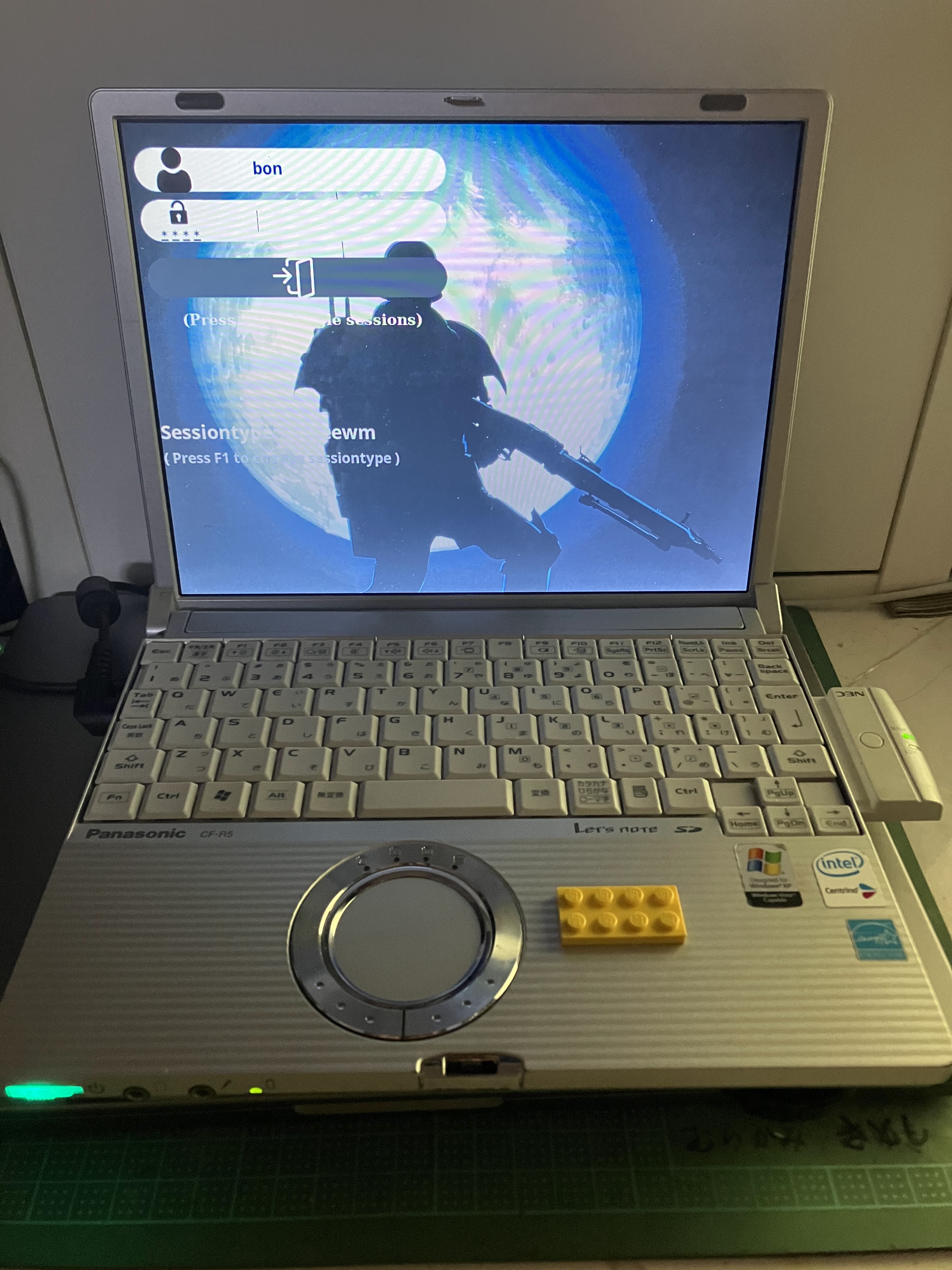
I will take a long-haul flight from Japan to Germany soon and I thought about things I could do to pass some time on the plane. Usually I'd just watch some movies and listen to podcasts etc, but that is a bit boring. Also, modern notebooks are so big, they don't fit well on the tray-table, especially when the person in front reclines their seat.
So, why not take a tiny old laptop and see how it goes?
The laptop is a Panasonic Let's note R5 CF-R5KW4AXS with the following specs:
Additional I plugged in:
Other hardware-related things:
Broken things:
As one would expect, the battery is long dead. I emptied out the case and kept the controller (in case I ever want to revive it).
In total, a quite powerful machine.
Originally this thing came with Windows XP SP-2. As much as I enjoy vintage computing, this is nothing I can survive with for daily use. Instead I installed the following
I expect to be able to use this laptop for a whole day (a bit more actually). During the flight and during the stop-over.
|
Usage |
Software |
Working |
Comments |
|
encryption |
gocryptfs |
y es |
CPU has no AES encryption, use -xchacha |
|
Terminal |
ROXTerm |
yes |
|
|
tmux |
yes |
|
|
|
Web |
Firefox ESR |
somewhat |
really slow |
|
Chromium |
somewhat |
can almost be usable with custom startup parameters |
|
|
NetSurf |
yes |
not great with modern web-sites |
|
|
Dillo |
yes |
limited with modern web-sites |
|
|
links2 |
yes |
my favorite browser |
|
|
|
neomutt |
Yes |
excellent! |
|
messaging |
|
barely |
web-client. heavy webapp , very slow |
|
yes |
|||
|
line |
barely |
only via chromium plugin. |
|
|
Signal |
no |
Official Client: No 32-bit Linux client. A whole story for itself. |
|
|
no |
Java client: No, not even with lot of effort (JVM>=22 vs 32bit ) |
||
|
yes |
unofficial libpurple plugin |
||
|
i-message |
No |
scnr . Of course not! |
|
|
video |
mpv |
Yes |
if the right codec |
|
music |
cmus |
Yes |
for the terminal (my default) |
|
xmms |
Yes |
If I feel like GUI |
|
|
reading |
MComix |
Yes |
For digital comic books |
|
writing |
vim |
Yes |
with plugins. My default |
|
AbiWord |
Yes |
If I need fancy WYSIWYG |
Life is not just work, but also play. So, what is doable?
|
Usage |
Software |
Working |
Comments |
|
puzzle / strategy |
XSkat |
YES |
Best game since 1995 |
|
Penguin * |
YES |
Solitaire and all that |
|
|
Pioneers |
YES |
native |
|
|
shooting / action |
Commander Genius |
YES |
aka Keen |
|
Open Tyrian |
YES |
Had to build it from source though |
|
|
Epic pinball |
YES |
dosbox |
|
|
Rocks'n'Diamonds |
YES |
Classic |
|
|
Slime Volley |
YES |
yeah |
|
|
Giana Sisters |
YES |
C64 emu |
|
|
Doom |
YES |
Zandronum |
|
|
Wolfenstein 3D |
YES |
EcWolf |
|
|
adventure |
ScummVM |
YES* |
For older games OK, but best stick to early 90s games |
|
BAK |
YES |
Dosbox |
|
|
Non-sense |
YDKJ |
YES |
Dosbox with Win 3.11 |
I cannot recommend this, unless you are like me and this kind of thing is your hobby and brings you joy. 32-bit support is more and more a thing of the past, so even if you are willing to compile a lot of software from source, more often than not you will run into limitations.
When the CPU load is high (for a long time), this laptop gets really hot. The touch-pad gets uncomfortably hot. Right next to it (above the CPU) it is so hot, that it hurts - not ideal. However, just watching movies and playing games, especially when clocking the CPU down, was no problem.
Ultimately, I will have to write this after my travel, but so far I am quite happy with the result. Let's see how everthing holds up during travel :-)


Maybe the first game I ever played on Linux is XSkat. The other day I wondered, if it would build on MacOS, and - yes, it does.

Here the patch:
diff --git a/Imakefile b/Imakefile
index ab1b892..06fd031 100644
--- a/Imakefile
+++ b/Imakefile
@@ -19,13 +19,28 @@
*/
/*DEFL=-DDEFAULT_LANGUAGE=\"german\"*/
+/* macOS-specific adjustments */
+#ifdef Darwin
+ # Use clang instead of gcc
+ CC = clang
+ # X11 paths for Homebrew
+ X11_BASE = /opt/X11
+ X11_INCLUDES = -I$(X11_BASE)/include
+ X11_LIBDIR = -L$(X11_BASE)/lib
+ # SDK paths
+ SDK_PATH = $(shell xcrun --show-sdk-path)
+ EXTRA_CFLAGS = -isysroot $(SDK_PATH) $(X11_INCLUDES)
+ EXTRA_LDFLAGS = $(X11_LIBDIR)
+#endif
+
+/* Language selection */
DEFL=-DDEFAULT_LANGUAGE=\"english\"
DEFI=-DDEFAULT_IRC_SERVER=\"irc.fu-berlin.de\"
DEFINES=$(DEFL) $(DEFI)
-LOCAL_LIBRARIES=$(XLIBONLY)
+LOCAL_LIBRARIES=$(XLIBONLY) $(EXTRA_LDFLAGS)
OBJS=skat.o ramsch.o null.o bitmaps.o xio.o xdial.o irc.o text.o
SRCS=skat.c ramsch.c null.c bitmaps.c xio.c xdial.c irc.c text.c
I had to install a few brew packages.
brew install imake xorgproto libx11 libxext libxt
Just randomly picked this thing up at HardOff on the weekend.

I thought for 1.1k Yen, I'll take it home and see what it does.
The manual is on archive.org - nice.
I found some RAM (1GB) and an old IDE HDD (from a broken G4 iBook) and threw it in.
I use a variable PSU at 16.5V - power on and all is working fine!
Well, the Bios backup battery is of course dead. I'll have to replace it, if I want to keep this thing.
Then I remembered, that somewhere in my parts bin should be a Pentium M CPU that I could screw in for a nice upgrade. It came with a Celeron 1.3GHz and I upgraded it to a Pentium 1.7GHz.
Next I grabbed the Recovery CDs and installed XP. Unfortunately I don't have the original Japanese CDs, but only the German ones - but they did the trick.
XP runs fantastic on this old machine, but there is only so much one can do with XP.
I did the whole shenanigans with legacyupdate and upgrade Windows as much as possible.
Then I removed a bit of bloat-ware (Norton 2004, really not what I want to deal with).
Next I ran a geekbench2 benchmark : 1151 - what a beast :)
About:

Recently I came across Commander Genius, which [..] let's just say is a way to play Commander Keen on modern machines.
Since I am on ARM64 Darwin, a bit of tweaking needs to be done to run this x86_64 solftware. Here my notes:
Open a x86_64 shell:
> arch -x86_64 zsh
Install homebrew in a different directory (I use /Volumes/1TBSSD/opt/homebrew-x86_64, choose what fits your need)
> mkdir /Volumes/1TBSSD/opt/homebrew-x86_64
> curl -L https://github.com/Homebrew/brew/tarball/master | tar xz --strip 1 -C/Volumes/1TBSSD/opt/homebrew-x86_64
% Total % Received % Xferd Average Speed Time Time Time Current
Dload Upload Total Spent Left Speed
0 0 0 0 0 0 0 0 --:--:-- --:--:-- --:--:-- 0
100 3812k 100 3812k 0 0 3721k 0 0:00:01 0:00:01 --:--:-- 9451k
> export PATH="/Volumes/1TBSSD/opt/homebrew-x86_64/bin:$PATH"
> which brew
/Volumes/1TBSSD/opt/homebrew-x86_64/bin/brew
> brew install openssl@3
DYLD_LIBRARY_PATH=/Volumes/1TBSSD/opt/homebrew-x86_64/lib:$DYLD_LIBRARY_PATH ./CGeniusExe
That is it.

Before the down-grade, I was running a hacked Nvidia GeForce, which replaced the original ATI (that I still have).
Firstly I was surprised that the card actually works. I guess I (or it) was lucky that it was only in the Junk bin without protection for long.
Test-setup:

As a bonus, my MacOS 9.2 partition is now usable again. I could not for the love of god get it to work with the Geforce.
So finally I can enjoy errors like this again :-)

I came across this random computer. It didn't (and still doesn't) work, but I thought I take it apart to figure out what it might be.


I took this baby apart, because the floppy drives where kind of stuck - they would not take disks. And also I wanted to check for any bios batteries to remove.

Yeah - greetings from 昭和62年, that thing has been removed.
It came with 2 expansion cards


Here some pictures of the mother and daughter boards


I was able to get the floppies going, but looking at the age of this thing, it probably wants DD disks, which I currently do not have. Speaking of the floppies, they are not standard - some weird thing going on with the eject button being in the middle.


So yesterday I take the kids to some park in 世田谷 and for Tokyo standards is a nice big park. While I stroll around, I notice some fellow bloody foreigners of the pale kind stalking through the undergrowth, apparently looking for something. I notice that even their kids are very involved in helping to find whatever they have lost, so it must be something really important - maybe their phone or car keys.
I was 0.5s away from asking them what they lost and if I can help looking for it. - Then it dawned on me. Today is Easter Sunday - they are looking for Easter Eggs. 🤦
So my trusty Samsung S8 died the other day without any apparent reason. It was just charging and all of a sudden in the middle of the night it starts screaming (well beeping really loud) and the screen flashes. Half drunken I just pushed the power button to shut it off. That is the last thing I ever heard of it. It was dead from the next day. I have insurance, however because the phone is "too old", there is no way to have it repaired. The only option is a A42 as a replacement phone. This sounds good, as it is a new phone and thus gets a somewhat recent Android version, however being an "A" phone from Samsung - it lacks a lot of features that my S8 had. I was never a big fan of the "Samsung Experience" (quite an awful experience imho), but I found multiple work-arounds via 3rd party apps to make it bearable (Nova, other keyboard, Bixby-button work-around app, force uninstall some apps via USB).
That made think: What are the average peasants options?
I came up with these for me:
